



 Buick Enclave: Rear Climate Control System (Rear Climate with Rear Seat Audio)
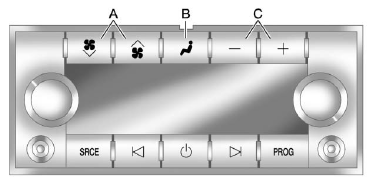
A. Fan Control
B. Air Delivery Mode Control
C. Temperature Control
For vehicles with the rear climate control system, the controls are located on the rear of the center console.
Press the REAR button on the front climate control system to turn the rear climate
control system on or off. The system also turns on if any of the rear controls,
except  , are pressed. An indicator
comes on when the rear system is on.
, are pressed. An indicator
comes on when the rear system is on.
The system can also be turned off, by pressing and holding
 .
.
Mimic Mode: This mode matches the rear climate control to the front climate control settings. It comes on when REAR is pressed.
Independent Mode: This mode directs rear seating airflow according to the settings of the rear controls. It comes on when any rear control is adjusted.
 (Fan Control): Press the fan up
or down buttons to increase or decrease the fan speed.
(Fan Control): Press the fan up
or down buttons to increase or decrease the fan speed.
Temperature Control:
Press + or − to increase or decrease the air temperature.
The temperature settings will display in 0-12 increments, going from the coolest (0) to the warmest (12) setting.
 (Air Delivery Mode Control):
Press to manually change the direction of the airflow. Repeatedly press the button until the desired mode appears on the display.
 (Vent): Air is directed through
the overhead outlets.
(Vent): Air is directed through
the overhead outlets.
 (Bi-Level): Air is directed through
the rear floor outlets, as well as the overhead outlets.
(Bi-Level): Air is directed through
the rear floor outlets, as well as the overhead outlets.
 (Floor): Air is directed through
the floor outlets. The rear system floor outlets are located under the third row
seats.
(Floor): Air is directed through
the floor outlets. The rear system floor outlets are located under the third row
seats.
 Rear Climate Control System (Rear Climate Control Only)
A. Fan Control
B. Temperature Control
C. Air Delivery Mode Control
For vehicles with the rear climate control system, the controls are located on
the rear of the center console. The system can ...
 Air Vents
Use the slider switch in the center of the outlet, to change the direction of
the airflow. Use the thumbwheel near the outlet to control the amount of airflow
or to shut off the airflow.
Keep all ...
See also:
If the engine fails to start
If the vehicle has been unlocked using the emergency key blade or the Smart Key
is not detected by the vehicle, it will be necessary to use the keyless start backup
to disarm the alarm and start t ...
Important safety notes
If a tire pressure monitor system is installed,
the vehicle's wheels have sensors that
monitor the tire pressures in all four tires. The
tire pressure monitor warns you when the
pressure drops in ...
Battery Load Management
The vehicle has Electric Power Management (EPM) that estimates the battery's
temperature and state of charge. It then adjusts the voltage for best performance
and extended life of the battery.
...


