



 Buick Enclave: Hazard Warning Flashers
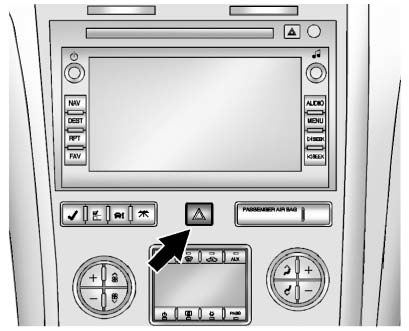
 Hazard Warning Flasher:
Press this button located on the instrument panel below the audio system, to make the front and rear turn signal lamps flash on and off.
This warns others that you are having trouble. Press again to turn the flashers off.
The turn signals do not work while the hazard warning flashers are on.
 Adaptive Forward Lighting (AFL)
Vehicles with the Adaptive Forward Lighting System (AFL) have headlamps that
swivel to the left or right when making a turn to provide better lighting. To enable
AFL, set the exterior lamp switch ...
 Turn and Lane-Change Signals
An arrow on the instrument panel cluster flashes in the direction of the turn
or lane change.
Move the lever all the way up or down to signal a turn.
Raise or lower the lever until the arrow sta ...
See also:
Center console, upper section
Vehicles with the Off-Road Pro
engineering package
1 Audio system/COMAND;
see separate operating
instructions
2 Hazard warning
lamps
3 Indicator
lamp
4 Seat heating
5 Seat ventila ...
Temperature
The temperature grades are A (the highest), B, and C, representing the tire’s
resistance to the generation of heat and its ability to dissipate heat when tested
under controlled conditions on a ...
Customer Satisfaction Procedure (Mexico)
Did you get the Warranty Extension Plan? This plan is recommended by General
Motors to supplement the warranty included with the new vehicle purchase.
See your dealer for details.
Customer Assis ...


