



 Infiniti QX: Fuel gauge
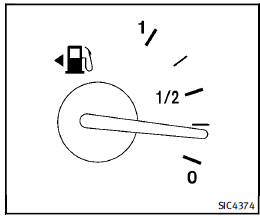
The gauge indicates the approximate fuel
level in the tank.
The gauge may move slightly during
braking, turning, acceleration, or going up
or down hills.
The gauge needle returns to 0 (Empty) after
the ignition switch is pushed to the OFF
position.
Refill the fuel tank before the gauge
registers “0” (Empty).
The low fuel warning  appears on the
dot matrix liquid crystal display when the
fuel tank is getting low. Refuel as soon as it
is convenient, preferably before the gauge
reaches “0”. There will be a small reserve
of fuel in the tank when the fuel gauge
needle reaches “0”.
The
appears on the
dot matrix liquid crystal display when the
fuel tank is getting low. Refuel as soon as it
is convenient, preferably before the gauge
reaches “0”. There will be a small reserve
of fuel in the tank when the fuel gauge
needle reaches “0”.
The  indicates that the fuel-filler door is
located on the driver’s side of the vehicle.
indicates that the fuel-filler door is
located on the driver’s side of the vehicle.
 CAUTION
► If the vehicle runs out of fuel, the
 malfunction indicator light (MIL) may
come on. Refuel as soon as possible.
After a few driving trips, the
malfunction indicator light (MIL) may
come on. Refuel as soon as possible.
After a few driving trips, the
 light
should turn off. If the light remains on
after a few driving trips, have the vehicle
inspected by an INFINITI retailer.
light
should turn off. If the light remains on
after a few driving trips, have the vehicle
inspected by an INFINITI retailer.
► For additional information, see “Malfunction
Indicator Light (MIL)” later in
this section.
 Engine coolant temperature gauge
The gauge indicates the engine coolant
temperature.
The engine coolant temperature is within
the normal range when the gauge needle
points within the zone 1 shown in the
illustration.
The ...
 Engine oil pressure gauge
The gauge indicates the engine lubrication
system oil pressure while the engine is
running. When the engine speed is high,
the engine oil pressure is also high. When
it is low, the gauge ind ...
See also:
Canceling Guidance
Guidance is canceled once the final destination is reached. To cancel guidance
prior to arrival at the final destination:
1. Press DEST.
2. Press Cancel Guidance.
3. Press OK to confirm.
Guidance ...
Socket in the cargo compartment
The socket is not suitable for operating
the tire inflation compressor.
► Lift up the cover of socket 1. ...
Head Restraint Adjustment
Do not drive until the head restraints for all occupants are installed and adjusted
properly.
To achieve a comfortable seating position, change the seatback recline angle
as little as necessary w ...


