



 Mercedes-Benz GL-Class: Compass
Calling up the compass
► Press the
 button on the
multifunction steering wheel repeatedly
until the Offroad menu appears in the
multifunction display.
button on the
multifunction steering wheel repeatedly
until the Offroad menu appears in the
multifunction display.
The compass shows which direction the vehicle is currently traveling in: N, NE, E, SE, S, SW, W or NW
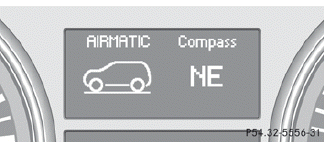
 If your vehicle does not have an AIRMATIC
package, the multifunction display only
shows the compass.
If your vehicle does not have an AIRMATIC
package, the multifunction display only
shows the compass.
 Clearing the memory of the integratedgarage door opener on the rear-viewmirror
► Turn the SmartKey to position 2 in the
ignition lock.
► Press transmitter buttons 2 and 4.
The indicator lamp lights up yellow.
► Press and hold transmitter buttons 2 and 4 ...
 Floormat on the driver's side
WARNING
Whenever you are using a floormat, make sure
there is enough clearance and that the
floormat is securely fastened.
The floormat should always be securely
fastened using the fa ...
See also:
General Towing Information
Only use towing equipment that has been designed for the vehicle.
Contact your dealer or trailering dealer for assistance with preparing the vehicle
for towing a trailer.
See the following trailer ...
Activating/deactivating climatecontrol
Important information
WARNING
When the climate control system is
deactivated, the outside air supply and
circulation are also deactivated. Only choose
this setting for a short time. O ...
General Information
For service and parts needs, visit your dealer. You will receive genuine GM parts
and GM-trained and supported service people.
Genuine GM parts have one of these marks:
...


