



 Buick Enclave: Windows
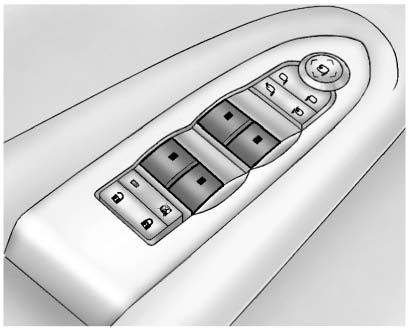
Press the switch to lower the window. Pull the switch up to raise it.
For more information, see Power Windows .
 Liftgate
To open the liftgate the vehicle must be in P (Park). Press the touch pad under
the liftgate handle. To close the liftgate, use the pull cup or pull strap as an
aid.
Power Liftgate
On vehicles w ...
 Seat Adjustment
Power Seat
A. Seat Adjustment Control B. Reclining Seatback Control C. Lumbar Adjustment
Control . Move the seat forward or rearward by moving the control (A) forward or
rearward.
► Rais ...
See also:
System settings
• Button feedback: Soft key confirmation tone on or off.
• Clock adjust: Select 12 and 24 hour clock. Use the arrow soft keys to
alter the time. Select Date to change the date, or to alter ...
When Should an Airbag Inflate?
Frontal airbags are designed to inflate in moderate to severe frontal or near-frontal
crashes to help reduce the potential for severe injuries mainly to the driver's
or right front passenger' ...
Hazard Warning Flashers
(Hazard Warning Flashers):
Press this button located on top of the steering column, to make the front and
rear turn signal lamps flash on and off. This warns others that you are having trouble.
...


