



 Buick Enclave: Instrument Panel
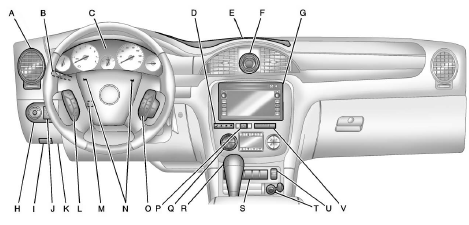
A. Air Vents .
B. Turn and Lane-Change Lever.
See Turn and Lane-Change Signals .
Windshield Wiper/Washer .
C. Instrument Cluster .
D. Driver Information Center (DIC) Buttons. See Driver Information Center (DIC) .
E. Instrument Panel Storage .
USB Port (Inside IP Storage).
Auxiliary Devices F. Clock .
G. Infotainment .
Navigation/Radio System (If Equipped). See the separate navigation manual.
H. Exterior Lamp Controls .
I. Hood Release. See Hood .
J. Instrument Panel Illumination Control .
K. Data Link Connector (DLC) (Out of View). See Malfunction Indicator Lamp .
L. Cruise Control .
M. Steering Wheel Adjustment .
N. Horn .
O. Steering Wheel Controls .
P. Hazard Warning Flashers .
Q. Dual Automatic Climate Control System .
R. Console Shift Lever.
See “Console Shift Lever” under Shifting Into Park .
S. Rear Window Wiper/Washer .
Traction Control System (TCS) Disable Button.
See StabiliTrak® System .
Tow/Haul Button (If Equipped).
See Tow/Haul Mode .
Power Liftgate Button (If Equipped). See Liftgate .
T. Power Outlets .
U. Heated and Ventilated Front Seats (If Equipped).
V. Passenger Air Bag Status Indicator. See Passenger Sensing System .
 In Brief
...
 Initial Drive Information
This section provides a brief overview about some of the important features that
may or may not be on your specific vehicle.
For more detailed information, refer to each of the features which can b ...
See also:
Limitations of use
The DATABASE is restricted for use in the specific system for which it was created.
Except to the extent explicitly permitted by mandatory applicable laws, you may
not extract or re-utilize substa ...
Using Your Stored Preset Destinations
These destinations are available for selection while driving.
1. Press to turn the system on.
2. A caution may appear. Press OK to proceed.
3. Press DEST.
4. Select one of the available preset de ...
High Voltage Devices and Wiring
WARNING
Exposure to high voltage can cause shock, burns, and even death. The high voltage
components in the vehicle can only be serviced by technicians with special training.
High voltage componen ...


