



 Infiniti QX: Tray
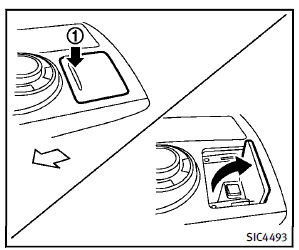
To open the tray, push the lid1 . To close, push the lid down. The USB and/or iPod® connector port is located inside the tray. (See “Audio system” in the “4. Monitor, climate, audio, phone and voice recognition systems” section or “iPod® player operation” in the “4. Monitor, climate, audio, phone and voice recognition systems” section.)
 Console box
Front
To open the console box, push up the knob
A and pull up the lid.
To close, push the lid down until latched.
Rear (if so equipped)
To open the lid, push the knob up A and
pull up th ...
 Coat hooks
The coat hooks are equipped at the rear
assist grips.
CAUTION
Do not place items which are more than 2 lb
(1 kg) on the hook.
...
See also:
Qualified specialist workshop
An authorized Mercedes-Benz Center is a
qualified specialist workshop. It has the
necessary specialist knowledge, tools and
qualifications to correctly carry out the work
required on your vehicle. ...
Resetting values
► Press the
button on the
steering wheel to select the trip
computer menu.
► Press the
button to select the
function that you wish to reset.
► Press and hold the R reset butt ...
Anti-theft Alarm System
On vehicles with an anti-theft alarm system, to activate the system:
► Press on the Remote Keyless Entry
(RKE) transmitter or the power door lock switch when any door is open.
The securit ...


