



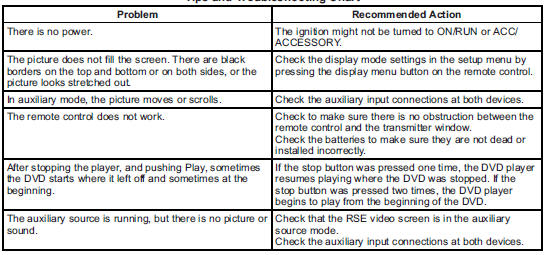
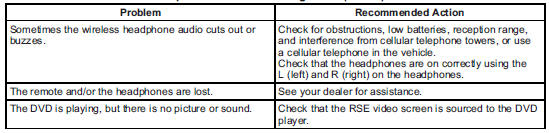
 Cadillac Escalade: Tips and Troubleshooting Chart
 Battery Replacement
To change the remote control batteries:
1. Slide the rear cover back on the remote control.
2. Replace the two batteries in the compartment. Make sure they are installed
correctly using the diagram ...
 DVD Display Error Messages
The DVD display error message depends on the radio that is in the vehicle. The
video screen can display one of the following:
Disc Load/Eject Error: This message displays when there are disc load or ...
See also:
What to Use
When windshield washer fluid needs to be added, be sure to read the manufacturer's
instructions before use. Use a fluid that has sufficient protection against freezing
in an area where the tempe ...
Rear Climate Control System (Rear Climate with Rear Seat Audio)
A. Fan Control
B. Air Delivery Mode Control
C. Temperature Control
For vehicles with the rear climate control system, the controls are located on
the rear of the center console.
Press the REAR ...
Crawl mode (locked access height)
When the vehicle is at Normal height and traveling less than 22 mph (35 km/h),
or at Access height, press down on the raise/lower switch for longer than 3 seconds
to lock the vehicle at access hei ...


