



 Mercedes-Benz GL-Class: Storing settings
With the memory function, you can store up to three different settings, e.g. for three different people.
The following settings are stored as a single memory preset:
• position of the seat, backrest and head
restraint
• driver's side: steering wheel position
• driver's side: position of the exterior
mirrors on the driver's and front-passenger
sides
WARNING 
Do not activate the memory function while
driving. Activating the memory function while
driving could cause the driver to lose control
of the vehicle.
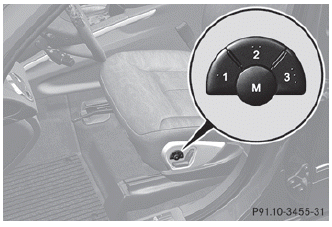
► Adjust the seat.
► On the driver's side, adjust the steering wheel and the exterior mirrors.
► Press memory button M and one of the storage position buttons 1, 2 or 3 within three seconds.
The settings are stored in the selected preset position. A tone sounds when the settings have been completed.
 Memory functions
...
 Calling up a stored setting
► Press and hold the relevant storage
position button 1, 2 or 3 until the seat,
steering wheel and exterior mirrors are in
the stored position.
The setting procedure is interrupted as
soon ...
See also:
How the System Works
The SBZA symbol lights up in the side mirrors when the system detects a vehicle
in the side blind zone, indicating it may be unsafe to change lanes. Before making
a lane change, check the SBZA displ ...
Lower Anchors
Lower anchors (A) are metal bars built into the vehicle. There are two lower
anchors for each LATCH seating position that will accommodate a child restraint
with lower attachments (B). ...
Screen modes
Touch the screen mode selection button to view a series of icons, each depicting
a different screen mode (as detailed below). Touch the relevant icon to select the
desired screen mode.
...


