



 Cadillac Escalade: Settings for Parental Control
Use the SETUP MENU to access the parental control feature. It allows for control of the type of movie rating content (from G to Adult) that can be viewed and is only accessible when no disc is loaded.
To setup the Parental Control:
1. Press the SETUP button on the remote control.
2. Use the left/right and down navigation arrows on the remote control to select the Parental sub-menu under the Preference Page.
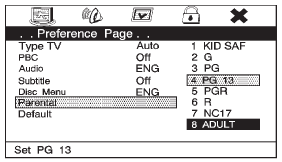
3. Press the SETUP button, and use the right and up/down navigation arrows to select any one of the available Rating settings from the display menu. The Rating settings are:
. Kid SAF
. G
. PG 13
. PG R
. R
. NC 17
. ADULT
4. Press the ENTER button to confirm the selection.
If a disc is inserted into the DVD compartment slot and it exceeds the Parental Setting, the following message appears on display:
The Parental Setting of this player prohibits play. Would you like to allow this disc to play?
If yes if selected, the six digit password must be entered for the disc to play. If the wrong password is entered, the following message appears:
This movie will not play due to the Parental Setting of the player.
To create a six digit password, use the numeric keypad on the remote control. Press the ENTER button to confirm. The default password is 136900.
To change the Parental Control Password:
1. Press the SETUP button on the remote control
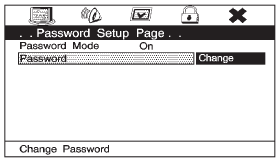
2. Navigate to the Password sub-menu under the Password Setup Page.
3. Press the right navigation arrow, then press ENTER.
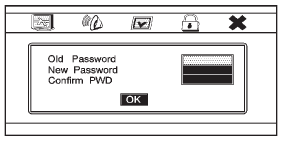
4. At the Old Password option, enter the old password or the default password (136900).
5. At the New Password option, enter the new password (six digits) using numeric buttons.
6. At the Confirm PWD option, confirm the new password by entering the new password again.
7. Scroll to the OK button and press ENTER. The message “Your password has been changed” displays.
 Using the Base RSE On-Screen Display (OSD) Menus
Use the OSD setup display menus for:
Initial setup
Display setup
Parental control setup
Adjusting the picture quality
Setting the various outputs
On-screen display language
To use the ...
 Rear Seat Audio (RSA) System
The loading slot for the DVD player is located at the top of the head restraint.
Insert the disc partially into the loading slot with the printed side facing the
rear of the vehicle. The DVD player ...
See also:
Filling the Tank
WARNING
Fuel vapor burns violently and a fuel fire can cause bad injuries. To help avoid
injuries to you and others, read and follow all the instructions on the fuel pump
island. Turn off the e ...
Temperature A, B and C
The temperature grades A (the highest), B,
and C, representing the tire’s resistance to
the generation of heat and its ability to
dissipate heat when tested under controlled
conditions on a ...
Memory Seats
The controls on the driver door are used to program and recall memory settings
for the driver seat, outside mirrors, power steering column, and the adjustable
throttle and brake pedals. ...


