



 Cadillac Escalade: Remote Keyless Entry (RKE) System
The RKE transmitter is used to remotely lock and unlock the doors from up to 60m (195 ft) away from the vehicle.
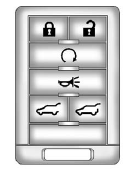
Press  to unlock the driver door.
Press again within three seconds
to unlock all remaining doors.
Press  to lock all doors.
Lock and unlock feedback can be personalized. See Vehicle Personalization .
Press and hold  to open or close
the liftgate.
to open or close
the liftgate.
Press and hold to open the
liftglass.
Press  and release to locate
the vehicle.
and release to locate
the vehicle.
Press  and hold for three seconds
to sound the panic alarm.
and hold for three seconds
to sound the panic alarm.
Press  again to cancel the panic
alarm.
again to cancel the panic
alarm.
See Keys and Remote Keyless Entry (RKE) System Operation .
 Initial Drive Information
This section provides a brief overview about some of the important features that
may or may not be on your specific vehicle.
For more detailed information, refer to each of the features which can be ...
 Remote Vehicle Start
With this feature the engine can be started from outside of the vehicle. ...
See also:
Ruts and gravel roads
Observe the following rules when driving
along ruts in off-road terrain or on roads with
loose gravel:
Check that the ruts are not too deep and
that your vehicle has sufficient clearance.
O ...
Emission control information label
The emission control information label is
attached as shown. ...
Engine Drive Belt Routing
Engine Drive Belt
Routing
...


