



 Buick Enclave: Power Seat Adjustment
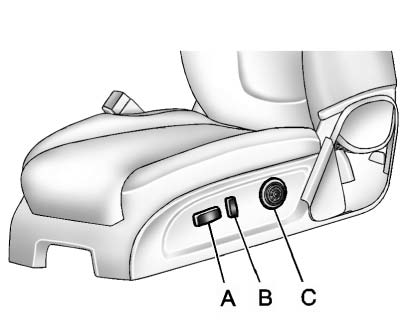
A. Seat Adjustment Control
B. Reclining Seatback Control
C. Lumbar Adjustment Control
► Raise or lower the front or rear part of the seat cushion by moving the front or rear of the control (A) up or down. ► Raise or lower the entire seat by moving the control (A) up or down.
To raise or recline the seatback, tilt the top of the control (B) forward or rearward. See Reclining Seatbacks .
Press the front or rear of the control (C) to increase or decrease lumbar support. See Lumbar Adjustment .
 Front Seats
...
 Lumbar Adjustment
Manual Lumbar
If available, move the handle forward or rearward to increase or decrease lumbar
support.
Power Lumbar
If available, press and hold the front or rear of control to incre ...
See also:
Manual Operation
(Fan Control): Press the up or down
arrows to increase or decrease the fan speed Pressing this button when the system
is off will turn the system on.
Pressing either arrow while using automatic op ...
Owner Checks and Services
At Each Fuel Stop
► Check the engine oil level.
See Engine Oil .
Once a Month
► Check the tire inflation pressures. See Tire Pressure .
► Inspect the tires for wear.
See Tire I ...
Range
This shows the predicted distance (miles or kilometers) that the vehicle should
travel on the remaining fuel, assuming fuel consumption stays constant. ...


