



 Mercedes-Benz GL-Class: Operation
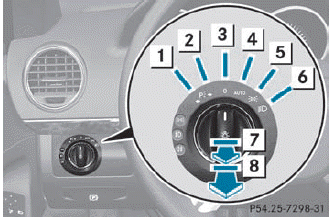
1 Left-hand standing lamps
2 Right-hand standing lamps
3 Lights off/daytime running lamps
4 Automatic headlamp mode/daytime
running lamps
Automatic headlamp mode/daytime
running lamps
5 Parking lamps, license plate and
instrument cluster lighting
Parking lamps, license plate and
instrument cluster lighting
6 Low-beam/high-beam headlamps
7 Vehicles without front fog lamps:
rear fog lamp
Vehicles without front fog lamps:
rear fog lamp
7 Vehicles with front fog lamps:
front
fog lamp
Vehicles with front fog lamps:
front
fog lamp
8 Vehicles with front fog lamps:
rear
fog lamp
Vehicles with front fog lamps:
rear
fog lamp
The turn signals, high-beam headlamps and the high-beam flasher are operated using the combination switch.
 Switch off the parking lamps and standing
lamps when you leave the vehicle. This
prevents the battery from discharging.
Switch off the parking lamps and standing
lamps when you leave the vehicle. This
prevents the battery from discharging.
The exterior lighting (except the parking/ standing lamps) switches off automatically if you:
• remove the SmartKey from the ignition
lock
• open the driver's door with the SmartKey
in position 0
If you hear a warning tone when you leave the vehicle, the lights may still be switched on.
► Turn the light switch to
 .
.
or
► If the rear fog lamp is switched on: press
the light switch in to the stop.
 Light switch
...
 Low-beam headlamps
► To switch on the low-beam headlamps:
turn the SmartKey in the ignition lock to
position 2 or start the engine.
► Turn the light switch to
.
The indicator lamp in the
instru ...
See also:
Cargo net
Important safety notes
WARNING
Make sure the cargo net is properly engaged
at top and bottom position and the tightening
belts are securely fastened.
Never use a damaged cargo net.
A ...
Customer Assistance Offices (Mexico)
To contact the Customer Assistance Center (CAC), use the phone numbers listed
in this section. Customer assistance is available Monday through Friday, 08:00 to
20:00 hours, and Saturdays from 08:00 ...
Important safety notes
You will find an illustration of the instrument
cluster in the "At a glance" section.
WARNING
A driver's attention to the road and traffic
conditions must always be his/her p ...


