



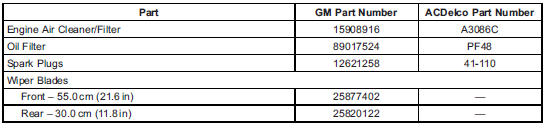
 Cadillac Escalade: Maintenance Replacement Parts
Replacement parts identified here by name, part number, or specification can be obtained from your dealer.
 Recommended Fluids and Lubricants
Fluids and lubricants identified below by name, part number, or specification
can be obtained from your dealer.
...
 Technical Data
...
See also:
Call priority
When service calls are active, e.g. Roadside
Assistance or MB Info calls, an emergency
call can still be initiated. In this case, an
emergency call will take priority and override
all other active ...
Setting the temperature
2-zone automatic climate control
Different temperatures can be set for the
driver's and front-passenger sides.
► Turn the SmartKey to position 2 in the
ignition lock.
► To increase/ ...
Headphones
The volume control for each set of headphones is adjusted on the headphones.
Press the channel selector button to cycle through available channels. Select
the channel appropriate for the required s ...


