



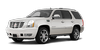
 Cadillac Escalade: Introduction

The names, logos, emblems, slogans, vehicle model names, and vehicle body designs appearing in this manual including, but not limited to, GM, the GM logo, CADILLAC, the CADILLAC Crest and Wreath, ESCALADE, and ESV are trademarks and/or service marks of General Motors LLC, its subsidiaries, affiliates, or licensors.
This manual describes features that may or may not be on your specific vehicle either because they are options that you did not purchase or due to changes subsequent to the printing of this owner manual. Please refer to the purchase documentation relating to your specific vehicle to confirm each of the features found on your vehicle. For vehicles first sold in Canada, substitute the name “General Motors of Canada Limited” for Cadillac Motor Division wherever it appears in this manual.
If the vehicle is a hybrid, see the hybrid supplement for more information.
Keep this manual in the vehicle for quick reference.

 Canadian Vehicle Owners
Propriétaires Canadiens
A French language copy of this manual can be obtained from your dealer or from:
On peut obtenir un exemplaire de ce guide en français auprès du concessio ...
See also:
Operational indicators
1. Engine start operation indicator
This indicator appears when the selector
lever is in the P (Park) position.
This indicator means that the engine will
start by pushing the ignition switch w ...
Top tether strap child restraint
If the manufacturer of your child restraint
requires the use of a top tether strap, it
must be secured to an anchor point.
WARNING
► In the 3rd row bench seat, a child
restraint with a ...
Important safety notes
WARNING
When leaving the vehicle, always remove the
SmartKey from the ignition lock. Always take
the SmartKey with you and lock the vehicle.
Do not leave children unattended in the
ve ...


