



 Buick Enclave: Head Restraints
The vehicle's front seats have adjustable head restraints in the outboard seating positions.
 WARNING
With head restraints that are not installed and adjusted properly, there is a
greater chance that occupants will suffer a neck/spinal injury in a crash.
Do not drive until the head restraints for all occupants are installed and adjusted properly.
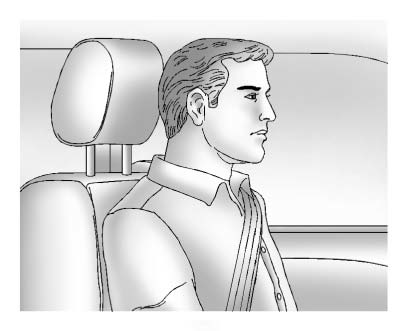
Adjust the head restraint so that the top of the restraint is at the same height as the top of the occupant's head. This position reduces the chance of a neck injury in a crash.
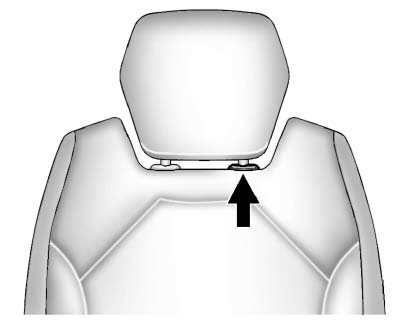
1. Pull the head restraint up to raise it. To lower the head restraint, press
the release button, located on the head restraint post on the top of the seatback,
while you push the head restraint down.
2. Push down on the head restraint after the button is released to make sure that
it is locked in place.
The vehicle's second-row seats have head restraints in the outboard seating positions that cannot be adjusted.
The vehicle's third-row seats have headrests in the outboard seating positions that cannot be adjusted.
The vehicle's head restraints and headrests are not designed to be removed.

 Front Seats
...
See also:
Center console, upper section
Vehicles with the Off-Road Pro
engineering package
1 Audio system/COMAND;
see separate operating
instructions
2 Hazard warning
lamps
3 Indicator
lamp
4 Seat heating
5 Seat ventila ...
Starting the Engine
Move the shift lever to P (Park) or N (Neutral). The engine will not start in
any other position. To restart the engine when the vehicle is already moving, use
N (Neutral) only.
Notice: Do not tr ...
Heated Rear Seats
The buttons are on the Rear Sear Audio (RSA) panel on the rear of the center
console.
Press or
to heat the left outboard or right
outboard seat cushion and to cycle through the temperature set ...


