



 Cadillac Escalade: Exterior Lighting
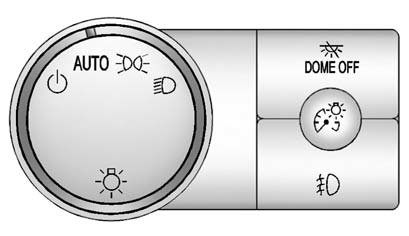
The exterior lamps control is located on the instrument panel to the left of the steering wheel.
 : Turns off the automatic headlamps
and Daytime Running Lamps (DRL). Turning the headlamp control to the off position
again will turn the automatic headlamps and DRL back on.
: Turns off the automatic headlamps
and Daytime Running Lamps (DRL). Turning the headlamp control to the off position
again will turn the automatic headlamps and DRL back on.
For vehicles first sold in Canada, the off position only works when the vehicle is shifted into the P (Park) position.
AUTO: Automatically turns on the headlamps at normal brightness, along with the parking lamps, instrument panel lights, license plate lamps, and taillamps.
 : Turns on the parking lamps, along
with the instrument panel lights, license plate lamps, and taillamps.
: Turns on the parking lamps, along
with the instrument panel lights, license plate lamps, and taillamps.
 : Turns on the headlamps, parking
lamps, instrument panel lights, license plate lamps, and taillamps.
: Turns on the headlamps, parking
lamps, instrument panel lights, license plate lamps, and taillamps.
For more information, see:
- Exterior Lamp Controls .
- Daytime Running Lamps (DRL) .
- Fog Lamps .
 Reading Lamps
For vehicles with reading lamps in the overhead console, press the button located
next to the lamp to turn it on or off.
The vehicle may also have reading lamps in other locations. The lamps cannot
...
 Windshield Wiper/Washer
The front and rear wiper controls are located on the turn and lane-change lever.
Turn the band with the wiper symbol to control the windshield wipers.
: For a single wipe, turn to
, then release. ...
See also:
Crawl mode (locked access height)
When the vehicle is at Normal height and traveling less than 22 mph (35 km/h),
or at Access height, press down on the raise/lower switch for longer than 3 seconds
to lock the vehicle at access hei ...
Fuel System Messages
FUEL LEVEL LOW
This message displays and a chime sounds if the fuel level is low. Refuel as
soon as possible.
See Fuel Gauge and Fuel for more information.
TIGHTEN GAS CAP
This messa ...
Playing a CD (In Either the DVD or CD Slot)
Insert a CD partway into the slot, label side up. The player pulls it in and
the CD should begin playing. (Loading a disc into the system, depending on media
type and format, ranges from five to 2 ...


