



 Cadillac Escalade: Dual Automatic Climate Control System
The heating, cooling, and ventilation in the vehicle can be controlled with this system. The vehicle also has a flow-through ventilation system described later in this section.
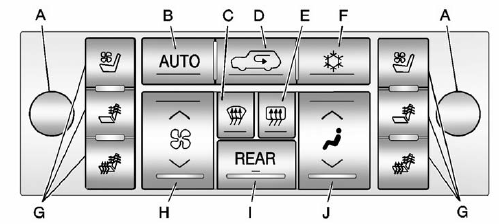
Climate Control with Heated and Cooled Seats Shown
A. Driver and Passenger Temperature Controls
B. AUTO (Automatic Operation)
C. Defrost
D. Recirculation
E. Rear Window Defogger
F. Air Conditioning
G. Heated and Cooled Seats
H. Fan Control
I. REAR (Rear Climate Control)
J. Air Delivery Mode Control
Off: Press the driver side temperature knob to turn the climate control system off. Outside air still enters the vehicle, and is directed to the floor. This direction can be changed by pressing the mode button. The temperature can also be adjusted using either temperature knob. Press the up or down arrows on the fan switch, the defrost button, the AUTO button, driver side temperature knob, or the air conditioning button to turn the system on when it is off.
Driver and Passenger Side Temperature Knob
The driver and passenger side temperature knobs are used to adjust the temperature of the air coming through the system on the driver or passenger side of the vehicle. The temperature can be adjusted even if the system is turned off. This is possible since outside air always flows through the system as the vehicle is moving forward unless it is set to recirculation mode. See “Recirculation” later in this section.
Turn the knob clockwise or counterclockwise to increase or decrease the cabin temperature. The display will show the temperature setting increasing or decreasing.
Set the passenger temperature setting to match the driver temperature setting by pressing the passenger temperature knob.
When in defrost mode the passenger temperature setting cannot be changed.

 Automatic Operation
AUTO (Automatic): When automatic operation is active the system will control
the inside temperature, the air delivery, and the fan speed.
Use the steps below to place the entire system in automatic ...
See also:
Vehicles with a TIREFIT kit
► Lift the cargo compartment floor up.
1 Jack
2 Towing eye
3 Ratchet wrench
4 Alignment bolt
5 Fuse allocation chart
6 Folding wheel chock
7 Lug wrench ...
Climate Controls
The heating, cooling, and ventilation in the vehicle can be controlled with this
system.
Climate Control with Cooled and Heated Seats shown
A. Driver and Passenger Temperature Controls
B. AUTO ( ...
Removing spots
Remove tar and oil spots, industrial dust,
insects, and tree sap as quickly as possible
from the paint surface to avoid lasting
damage or staining. Special cleaning
products are available at a ...


