



 Range Rover: Terrain response operation
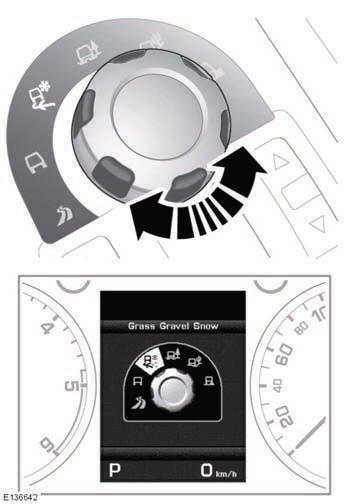
A rotary control just in front of the gear lever is used to select the required special program.
Information relating to the suitability of each terrain response program on different types of surface, is given on the touch screen, via the Extra features soft key. Touch the terrain response icon, then the information icon. The displayed text is relevant to the currently selected terrain response program.
 Before driving off-road
Before venturing off-road, it is absolutely essential that inexperienced drivers
become fully familiar with the vehicle's controls. In particular, CommandShift™,
Hill Descent Control (HDC) a ...
 General program (special programs off)
This program is compatible with all on and off-road conditions. If not already
active, it should be selected before driving on surfaces which are similar to a
hard road surface. Dry cobbles, tar ...
See also:
Headlight switch
Lighting
1 Turn the switch to the
position:
The front parking, side marker, tail,
license plate and instrument lights
will come on.
2 Turn the switch to the position:
Headlights wil ...
Lower Anchors
Lower anchors (A) are metal bars built into the vehicle. There are two lower
anchors for each LATCH seating position that will accommodate a child restraint
with lower attachments (B). ...
MB Info call button
► Open the stowage compartment under the
armrest.
► Press and hold MB Info call button 1
for
more than two seconds.
This initiates a call to the Mercedes-Benz
Customer Assistanc ...


