



 Buick Enclave: Second Row Seats
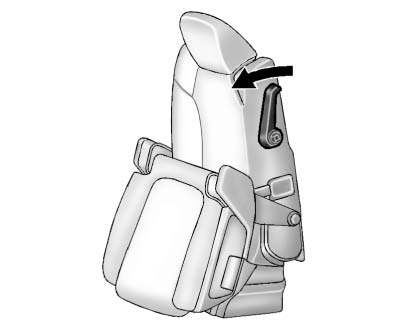
The second row seat can be folded to access the third row. Pull the sliding seat lever forward; the seat cushion folds, and the seat slides forward.
See Rear Seats .
 Memory Features
On vehicles with the memory feature, the controls on the driver door are used
to program and recall memory settings for the driver seat, outside mirrors, and
power steering column, if available. ...
 Third Row Seats
The third row seatbacks can be folded forward, and the seats can be removed.
To fold the third row seatback:
1. Remove anything on or under the seat.
2. Disconnect the rear safety belt mini-latch ...
See also:
Front Wiper Blade Replacement
1. Pull the windshield wiper arm connector away from the windshield.
2. Squeeze the grooved areas on each side of the blade, and turn the blade assembly
away from the arm connector.
3. Install ...
On-pavement and off-road driving precautions
Utility vehicles have a significantly higher
rollover rate than other types of vehicles.
They have higher ground clearance than
passenger cars to make them capable of
performing in a variety of ...
Tire tread
WARNING
Although the applicable federal motor vehicle
safety laws consider a tire to be worn when
the tread wear indicators (TWI) become
visible at approximately 1/16 in (1.6 mm), we r ...


