



 Buick Enclave: Roof
Sunroof
The ignition must be in ON/RUN or ACC/ACCESSORY to operate the sunroof and power sunshade.
See Retained Accessory Power (RAP) .
The vehicle may have a sunroof over the front seats and a rear sunroof over the second row seats.
The rear sunroof does not open.
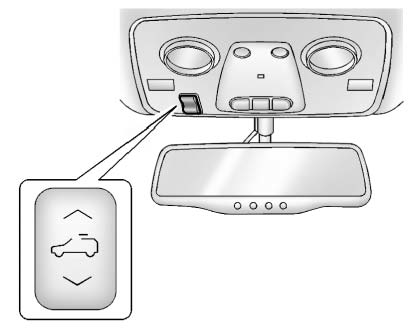
The switch to operate the front sunroof is on the headliner above the rearview mirror.
Vent: From the closed position, press and hold the front of the switch to vent the sunroof. Press and hold the rear of the switch to close the sunroof.
Express-open/Express-close:
From the closed position, press and release the rear of the switch to express-open the sunroof. Press and release the front of the switch to express-close the sunroof.
Manual Sunshade
The front sunshade must be opened and closed manually.
To open the sunshade, press the button on the sunshade handle to release it and guide it back.
To close the sunshade, pull the sunshade forward until it latches.
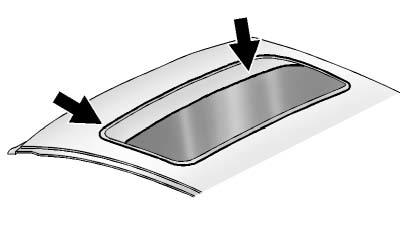
Do not keep the sunroof open for long periods of time while the vehicle is not in use. Dirt and debris may collect on the sunroof seal or in the track. This could cause an issue with sunroof operation, noise, or plugging the water drainage system. Periodically open the sunroof and remove any obstacles or loose debris. Wipe the sunroof seal and roof sealing area using a clean cloth, mild soap, and water.
Do not remove grease from the sunroof.
 Sun Visors
Pull the sun visor down to block glare. Detach the sun visor from the center
mount to pivot to the side window, or to extend along the rod, if available. ...

See also:
Charging the batter
WARNING
Never charge a battery still installed in the
vehicle unless a battery charger unit approved
by Mercedes-Benz is being used. Gases may
escape during charging and cause explosio ...
Instrument brightness control
The instrument brightness control switch
can be operated when the ignition switch
is in the ON position. When the switch is
operated, the dot matrix liquid crystal
display switches to the ...
Using the Uplevel RSE On-Screen Display (OSD) Menus
Use the OSD setup display menus for:
. General Setup
. Audio Setup
. Quality Setup
. Preference Setup
To use the OSD menus while using the DVD player or an auxiliary device:
1. Press the SETUP b ...


