



 Cadillac Escalade: Removal and Installation of the Sealant Canister
To remove the sealant canister:
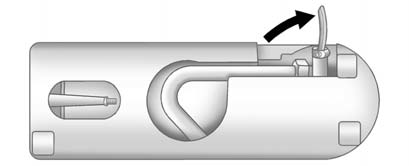
1. Unlock the air only hose (F) from the tire sealant canister (B) by pulling up on the lever.
2. Pull the air only hose (F) from the tire sealant canister (B).
3. Unwrap the sealant/air hose (G) from the compressor (A).
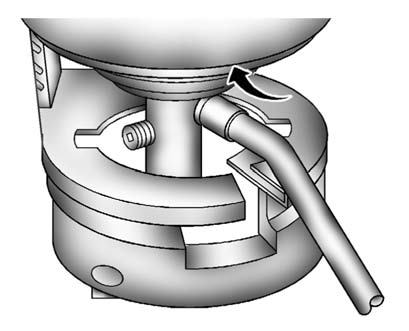
4. Turn the tire sealant canister (B) so the inflator filling hose is aligned with the slot in the compressor.
5. Lift the tire sealant canister (B) from the compressor and replace with a new sealant canister. See your dealer for more information.
To install a new sealant canister:
1. Align the sealant/air hose (G) with the slot in the air compressor.
2. Push the tire sealant canister (B) down and turn it clockwise.
3. Wrap the sealant/air hose (G) around the air compressor channel to stow it in
its original location.
4. Push the air only hose (F) onto the sealant canister inlet and push the lever
down.
 Using the Tire Sealant and Compressor Kit without Sealant to Inflate a Tire
(Not Punctured)
Using the Tire Sealant and Compressor Kit without Sealant to Inflate a Tire
(Not Punctured)
To use the air compressor to inflate a tire with air only and not sealant:
If a tire goes flat, avoid further tire and wheel damage by driving slowly to
a level place. Turn on the hazard warning f ...
 Storing the Tire Sealant and Compressor Kit
The tire sealant and compressor kit is located under the storage tray on the
driver side trim panel (over the rear wheelhouse).
To access the tire sealant and compressor kit:
1. Remove the tray b ...
See also:
Displaying the current fuelconsumption
► Press
on the steering wheel
to select the trip computer menu.
► Press
to select
Consumption.
The current fuel consumption is displayed.
...
One-touch window operation
All four windows have one-touch operation. Briefly pull the switch up fully and
release, the window will continue to raise until fully closed. Briefly press the
switch down fully and release, the ...
Useful information
This Operator's Manual describes all
models and all standard and optional
equipment of your vehicle available at the
time of publication of the Operator's
Manual. Country-specific differences are ...


