



 Cadillac Escalade: Remote Keyless Entry (RKE) System
The RKE transmitter is used to remotely lock and unlock the doors from up to 60m (195 ft) away from the vehicle.
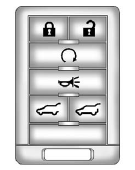
Press  to unlock the driver door.
Press again within three seconds
to unlock all remaining doors.
Press  to lock all doors.
Lock and unlock feedback can be personalized. See Vehicle Personalization .
Press and hold  to open or close
the liftgate.
to open or close
the liftgate.
Press and hold to open the
liftglass.
Press  and release to locate
the vehicle.
and release to locate
the vehicle.
Press  and hold for three seconds
to sound the panic alarm.
and hold for three seconds
to sound the panic alarm.
Press  again to cancel the panic
alarm.
again to cancel the panic
alarm.
See Keys and Remote Keyless Entry (RKE) System Operation .
 Initial Drive Information
This section provides a brief overview about some of the important features that
may or may not be on your specific vehicle.
For more detailed information, refer to each of the features which can be ...
 Remote Vehicle Start
With this feature the engine can be started from outside of the vehicle. ...
See also:
Manual Operation
(Fan Control): Press the up or down
arrows to increase or decrease the fan speed Pressing this button when the system
is off will turn the system on.
Pressing either arrow while using automatic op ...
Windshield Wipers
If the wiper motor overheats due to heavy snow or ice, the windshield wipers
will stop until the motor cools and will then restart.
Although the circuit is protected from electrical overload, overlo ...
Seat belt locking mechanism
The rear outer seat belts and front passenger seat belts have a locking mechanism
which improves the retention of child seats. The procedure to install a child seat
is as follows:
1. Place the ch ...


