



 Range Rover: Remote key fob battery replacement
Note: There are two designs of Smart Key, refer to the information which is relevant to the design of Smart Key supplied with the vehicle.
When the battery needs renewing, there will be a significant decrease in the effective range and the message SMART KEY BATTERY LOW will be displayed in the message center.
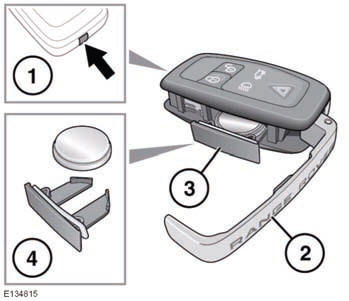
To renew the battery:
1. Press and hold the release button.
2. Open the side cover.
3. Remove the battery drawer and remove the battery.
4. Fit a new CR2032 type battery (available from your Land Rover Retailer/Authorized
Repairer), with the positive (+) side upwards.
When the battery needs renewing, there will be a significant decrease in the effective range and the message SMART KEY BATTERY LOW will be displayed in the message center.
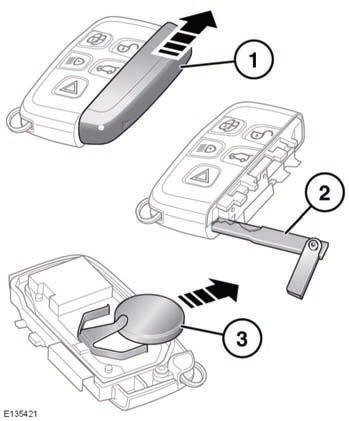
To renew the battery:
1. Slide the cover in the direction of the arrow until a click is heard. Remove
the cover.
2. Use the emergency key blade to separate the Smart key body.
3. Fit a new CR2032 type battery (available from your Land Rover Retailer/Authorized
Repairer), with the positive (+) side upwards.
Note: Avoid touching the new battery, as moisture/oil from fingers can reduce battery life and corrode the contacts.
Refit the parts in reverse order, ensuring that they click securely into place.
 Battery disposal: Used
batteries must be disposed of correctly, as they contain harmful substances. Seek
advice on disposal from your Land Rover Retailer/Authorized Repairer and/or your
local authority.
Battery disposal: Used
batteries must be disposed of correctly, as they contain harmful substances. Seek
advice on disposal from your Land Rover Retailer/Authorized Repairer and/or your
local authority.
 Tailgate opening height
It is possible to set the maximum height to which a powered tailgate will open.
This is useful in parking areas with very low roofs or just for ease of use.
1. Open the tailgate to the position whi ...

See also:
Rear Passenger Cupholders
Pull down on the lid to access the cupholders in the rear floor console.
Vehicles with the rear seat armrest may also contain cupholders. Pull down the
armrest to use the cupholders. ...
Odometer
The vehicle's odometer works together with the Driver Information Center (DIC).
The Trip odometer can be set. See “Trip Odometer” under Driver Information Center
(DIC) for more i ...
Key and Lock Messages
REPLACE BATTERY IN REMOTE KEY
This message displays if a Remote Keyless Entry (RKE) transmitter battery is
low. The battery needs to be replaced in the transmitter. See “Battery Replacement”
un ...


