



 Cadillac Escalade: Reclining Seatbacks (Bucket Seats Only)
On vehicles with second row bucket seats, the seatbacks can be reclined.
To recline the seatback:
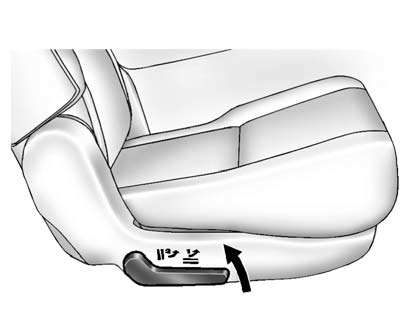
1. Lift the lever on the outboard side of the seat.
2. Move the seatback to the desired position, and then release the lever to lock the seatback in place.
3. Push and pull on the seatback to make sure it is locked.
To return the seatback to the upright position:
1. Lift the lever fully without applying pressure to the seatback, and the seatback will return to the upright position.
 WARNING
If either seatback is not locked, it could move forward in a sudden stop or crash. That could cause injury to the person sitting there. Always push and pull on the seatbacks to be sure they are locked.
2. Push and pull on the seatback to make sure it is locked.
 Second Row Seats
The second row seats can be folded for additional cargo space or folded and tumbled
for easy entry and exit to the third row seat, if equipped. The seat has either
the manual fold and tumble feature ...
 Manual Fold and Tumble Feature
Folding and Tumbling the Seat
To fold and tumble the seat:
1. Make sure that there is nothing under, in front of, or on the seat.
Notice: Folding a rear seat with the safety belts still fastened ma ...
See also:
Order of Play
Compressed audio files are accessed in the following order:
► Playlists.
► Files stored in the root directory.
► Files stored in folders in the root directory.
Tracks are played ...
Traction Control Operation
TCS is part of the StabiliTrak system. Traction control limits wheel spin by
reducing engine power to the wheels (engine speed management) and by applying brakes
to each individual wheel (brake-trac ...
Fuel Additives
To provide cleaner air, all gasolines in the United States are now required to
contain additives that help prevent engine and fuel system deposits from forming,
allowing the emission control system ...


