



 Mercedes-Benz GL-Class: Low-beam headlamps (halogenheadlamps)
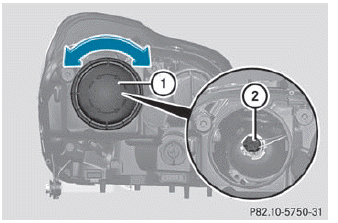
► Switch off the lights.
► Open the hood.
► Turn housing cover 1 counter-clockwise
and pull it out.
► Turn bulb holder 2 counter-clockwise and
pull it out.
► Take the bulb out of bulb holder 2.
► Insert the new bulb into bulb holder 2.
► Insert bulb holder 2 into the lamp and
turn
it clockwise.
► Align housing cover 1 and turn it
clockwise until it engages.

 High-beam headlamps
► Switch off the lights.
► Open the hood.
► Turn housing cover 1
counter-clockwise
and pull it out.
► Turn bulb holder 2
counter-clockwise and
pull it out.
► ...
See also:
Important safety notes
WARNING
Grains of sand, particles of dirt and other
abrasive materials can enter the brake system. This can lead to excessive wear
and
unpredictable braking efficiency.
After the bra ...
Safety Belt Care
Keep belts clean and dry.
WARNING
Do not bleach or dye safety belts. It may severely weaken them. In a crash, they
might not be able to provide adequate protection. Clean safety belts only with ...
Remote Vehicle Start
Starting the Vehicle
With this feature the engine can be started from outside of the vehicle.
1. Aim the RKE transmitter at the vehicle.
2. Press and release
3. Immediately after completing Step ...


