



 Infiniti QX: Locking with power door lock switch
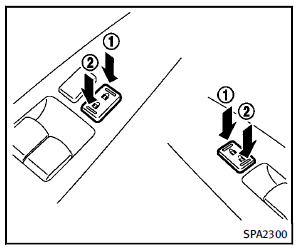
Operating the power door lock switch will lock or unlock all the doors. The switches are located on the driver’s and front passenger’s door armrests. To lock the doors, push the power door lock switch to the lock position 1 . Be sure not to leave the Intelligent Key inside the vehicle. To unlock the doors including the fuel-filler door, push the power door lock switch to the unlock position 2 .
Lockout protection
When the power door lock switch (driver or front passenger) is moved to the lock position with any door open, all doors will lock and unlock automatically. With the Intelligent Key left in the vehicle and any door open, all doors will unlock automatically and a chime will sound after the door is closed. These functions help to prevent the Intelligent Key from being accidentally locked inside the vehicle.
 Locking with inside lock knob
To lock the door individually, move the
inside lock knob to the lock position 1 .
To unlock, move the inside lock knob to the
unlock position 2 .
Be sure not to leave the Intelligent Key
in ...
 Automatic door locks
► All doors lock automatically when the
vehicle speed reaches 15 MPH (24
km/h).
► All doors unlock automatically when the
ignition switch is placed in the OFF
position.
The aut ...
See also:
Engine Cover
A. Oil Fill Cap
B. Engine Cover
To remove:
1. Remove the oil fill cap (A).
2. Raise the engine cover (B) to release it from the retainers.
3. Lift and remove the engine cover.
4. Reverse Steps ...
GM Mobility Reimbursement Program (U.S. and Canada)
This program is available to qualified applicants for cost reimbursement of eligible
aftermarket adaptive equipment required for the vehicle, such as hand controls or
a wheelchair/ scooter lift fo ...
Alerts
The ALERT! option in the Category section of the Station list (see item 7) will
alert you to a crisis of national or international importance. Any radio broadcast
or other audio playback will be i ...


