



 Cadillac Escalade: Fog Lamps
For vehicles with fog lamps, they can be used for better vision in foggy or misty conditions. The parking lamps and/or low-beam headlamps must be on for the fog lamps to work.
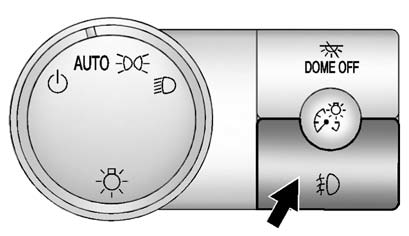
The fog lamp button is located on the left side of the instrument panel.
 (Fog Lamps): Press to turn the fog
lamps on or off. An indicator light comes on in the instrument panel cluster to
show that the fog lamps are on.
(Fog Lamps): Press to turn the fog
lamps on or off. An indicator light comes on in the instrument panel cluster to
show that the fog lamps are on.
Remember, fog lamps alone will not give off as much light as the headlamps. Never use the fog lamps in the dark without turning on the headlamps.
The fog lamps will go off whenever the high-beam headlamps come on. When the high beams go off, the fog lamps will come on again.
The fog lamps will be cancelled after the ignition is turned off. To use the fog lamps after restarting the vehicle, press the fog lamp button again.
Some localities have laws that require the headlamps to be on along with the fog lamps.
 Turn and Lane-Change Signals
An arrow on the instrument panel cluster flashes in the direction of the turn
or lane change.
Move the turn signal lever all the way up or down to signal a turn.
Raise or lower the lever until th ...

See also:
No Folder
When the CD contains only compressed files, the files are located under the root
folder. The next and previous folder functions will have no function on a CD that
was recorded without folders or pla ...
Poisonous fluids
Fluids used in motor vehicles are poisonous and should not be consumed or brought
into contact with open wounds.
For your own safety, always read and obey all instructions printed on labels
and c ...
Introduction
California proposition 65 warning
WARNING
Engine exhaust, some of its constituents, and certain vehicle components contain
or emit chemicals known to the State of California to cause cancer, ...


