



 Buick Enclave: Engine Compartment Overview
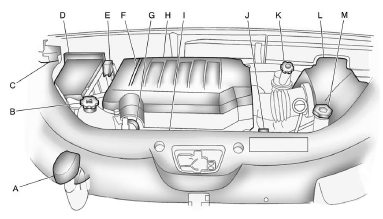
A. Radiator Pressure Cap. See Cooling System .
B. Engine Coolant Recovery Cap. See Cooling System .
C. Remote Negative (−) Terminal.
See Jump Starting .
D. Engine Compartment Fuse Block .
E. Remote Positive (+) Terminal.
See Jump Starting .
F. Power Steering Reservoir and Cap (under engine cover).
See Power Steering Fluid .
G. Engine Oil Fill Cap. See “When to Add Engine Oil” under Engine Oil .
H. Engine Cover .
I. Engine Oil Dipstick (out of view). See “Checking Engine Oil” under Engine Oil
.
J. Automatic Transmission Fluid Dipstick. See “Checking the Fluid Level” under Automatic
Transmission Fluid .
K. Brake Master Cylinder Reservoir. See “Brake Fluid” under Brakes .
L. Engine Air Cleaner/Filter .
M. Windshield Washer Fluid Reservoir. See “Adding Washer Fluid” under Washer Fluid
.
 Hood
Hood
To open the hood:
1. Pull the hood release handle with this symbol on it. It is located under the
instrument panel on the driver side of the vehicle.
2. At the front of the vehicle, pull up on ...
 Engine Cover
A. Oil Fill Cap
B. Engine Cover
To remove:
1. Remove the oil fill cap (A).
2. Raise the engine cover (B) to release it from the retainers.
3. Lift and remove the engine cover.
4. Reverse Steps ...
See also:
Hydroplaning
Hydroplaning is dangerous. Water can build up under the vehicle's tires so they
actually ride on the water. This can happen if the road is wet enough and you are
going fast enough. When the vehi ...
Topping up the coolant
WARNING
Never remove the filler cap when the engine is hot - escaping steam or scalding
water could cause serious personal injury.
Avoid spilling antifreeze onto a hot engine - a fire may res ...


