



 Mercedes-Benz GL-Class: Displaying the coolant temperature
WARNING 
Driving when your engine is overheated can
cause some fluids which may have leaked into the engine compartment to catch
fire. You could be seriously burned.
Steam from an overheated engine can cause
serious burns which can occur just by opening
the engine hood. Stay away from the engine
if you see or hear steam coming from it.
Stop the vehicle in a safe location away from
other traffic. Turn off the engine, get out of the
vehicle and do not stand near the vehicle until
the engine has cooled down.
► Press the
 button on the
steering wheel to select the standard
display.
button on the
steering wheel to select the standard
display.
► Press the
 button to select the
coolant temperature.
button to select the
coolant temperature.
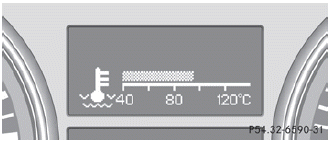
Under normal driving conditions, with the correct anti-corrosion and antifreeze additive concentration, the reading may rise to 248 °F(120 °C).
 If the coolant temperature exceeds
248 °F(120 °C) do not continue driving. The
engine will otherwise be damaged.
If the coolant temperature exceeds
248 °F(120 °C) do not continue driving. The
engine will otherwise be damaged.
 Standard display
► Press the
button on the
steering wheel to select the standard
display.
Standard display
1 Trip odometer
2 Odometer
You can select the following functions in the
Standard display men ...
 Displaying the digital speedometer oroutside temperature
If you have selected the digital speedometer
for the status bar, the outside
temperature is displayed here.
► Press the
button on the
steering wheel to select the standard
display.
...
See also:
Passenger Sensing System
If the vehicle has the passenger airbag status indicator pictured in the following
illustration, then the vehicle has a passenger sensing system for the right front
passenger position. The passenger ...
OnStar® Destination Download (US and Canada)
OnStar Destination Download (if equipped) is a service available for OnStar subscribers
that makes operating your navigation system much simpler. It allows subscribers
to request and receive navigat ...
Tow/Haul Mode
(Tow/Haul): The vehicle may have
a Tow/Haul mode.
The button is located on the instrument panel under the climate controls.
Push the button to activate the system. Push it again to deactivate the ...


