



 Mercedes-Benz GL-Class: Changing the set speed whilethe vehicle is in motion
When DSR is activated, the control speed can be changed to a value between 3 mph and 10 mph (Canada: between 4 km/h and 18 km/h) during the journey.
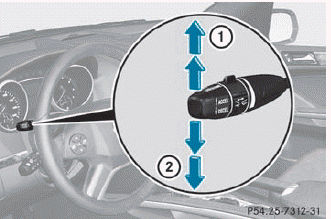
► To increase or decrease in 1 mph (Canada: 1 km/h) increments: press the cruise control lever to the point of resistance briefly upwards 1 for a higher control speed or briefly downwards 2 for a lower control speed.
The set value appears in the multifunction display.
► To increase or decrease in 5 mph (Canada: 10 km/h) increments: push the cruise control lever beyond the point of resistance briefly upwards 1 for a higher control speed or briefly downwards 2 for a lower control speed.
The set value appears in the multifunction display.
 Activating/deactivating DSR
Activating
DSR can only be activated if you are driving
no faster than 20 mph (30 km/h).
Vehicle without the Off-Road Pro Engineering
package
Vehicle with the Off-Road Pro Engineering package ...
 Off-road drive program
The off-road drive program is available
only in vehicles without the Off-Road Pro
engineering package.
The off-road drive program assists you in
driving off-road. The engine’s performance
ch ...
See also:
Loading compact discs
NOTICE
Do not force the disc into the slot.
NOTICE
Do not use irregular shaped CDs and CDs with a scratch protection film or self-adhesive
labels attached.
NOTICE
The CD unit wil ...
Emergency
With Automatic Crash Response, the built-in system can automatically connect
to help in a crash even if you cannot ask for it.
Push to connect to an Emergency
Advisor. GPS technology is used to ...
CD/DVD Player
The player can be used for CD, MP3, and as a DVD video player. Read this section
for more information about DVD video.
When playing an audio CD the rear seat operator can power on the RSE video scre ...


