



 Mercedes-Benz GL-Class: Adjusting the four-way lumbarsupport
You can adjust the contour of the driver's seat backrests individually to provide optimum support for your back.
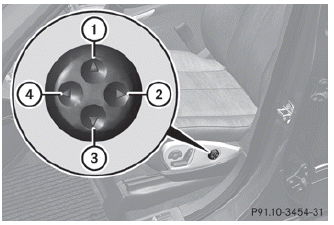
1 To raise the backrest contour
2 To soften the backrest contour
3 To lower the backrest contour
4 To harden the backrest contour
 Adjusting the multicontour seat
You can adjust the contour of the front seats
individually so as to provide optimum support
for your back and sides.
► Make sure that the SmartKey is in
position
2 in the ignition lock.
...

See also:
When It Is Time for New Tires
Factors, such as maintenance, temperatures, driving speeds, vehicle loading,
and road conditions affect the wear rate of the tires.
Treadwear indicators are one way to tell when it is time for new ...
Cruise control operations
The cruise control allows driving at a speed
between 25 to 90 MPH (40 to 144 km/h)
without keeping your foot on the accelerator
pedal.
To turn on the cruise control, push the
MAIN switch on. ...
Mirror Adjustment
1. Press (A) or (B) to select the driver or passenger side mirror.
2. Press the arrows on the control pad to move the mirror up, down, right, or
left.
3. Press the opposite side to get the control ...


