



 Buick Enclave: Windshield Wiper/Washer
The windshield wiper/washer lever is located on the left side of the steering column.
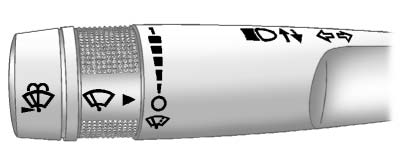
Turn the band with the wiper symbol to control the windshield wipers.
 : Use for a single wiping cycle.
 : Use to turn the wipers off.
 : Delays wiping cycle. Turn the
band up for more frequent wipes or down for less frequent wipes.
: Delays wiping cycle. Turn the
band up for more frequent wipes or down for less frequent wipes.
2 : Fast wipes.
Windshield Washer
 Press the button at the end
of the turn signal/lane change lever to spray washer fluid on the windshield.
Press the button at the end
of the turn signal/lane change lever to spray washer fluid on the windshield.
Rear Window Wiper/Washer
The rear wiper and rear wash button is located on the instrument panel below the climate control system.
 Press to turn the rear wiper on
and off. The wiper speed cannot be changed.
Press to turn the rear wiper on
and off. The wiper speed cannot be changed.
 Press to spray washer fluid on the
rear window. The window wiper will also come on.
Press to spray washer fluid on the
rear window. The window wiper will also come on.
See Windshield Wiper/Washer and Rear Window Wiper/Washer .
 Exterior Lighting
The exterior lamps control is located on the instrument panel, to the left of
the steering wheel.
: Turns the automatic light control
on or off.
AUTO: Automatic operation of the headlamps at ...
 Climate Controls
A. Fan Control
B. AUTO (Auto Operation)
C. Defrost
D. Air Recirculation
E. REAR (Rear Climate Control)
F. Air Delivery Mode Control
G. Driver Side Temperature Control
H. Display
I. P ...
See also:
Delayed Entry Lighting
Delayed entry lighting illuminates the interior for a period of time after all
the doors have been closed.
The ignition must be off for delayed entry lighting to work. Immediately after
all the d ...
Multifunction steering wheel
1 Multifunction display
2 COMAND; see the separate
operating instructions
3 Rejects or ends a call
Exits phone book/redial memory
Makes or accepts a call
Switches to the redial
mem ...
Driving
Important safety notes
WARNING
Make sure absolutely no objects are
obstructing the pedals' range of movement.
Keep the driver's footwell clear of all
obstacles. If there are any floor ...


