



 Mercedes-Benz GL-Class: Vehicle data, GL 550
The data stated here refers specifically to a vehicle with standard equipment. Consult an authorized Mercedes-Benz Center for the data for all vehicle variants and trim levels.
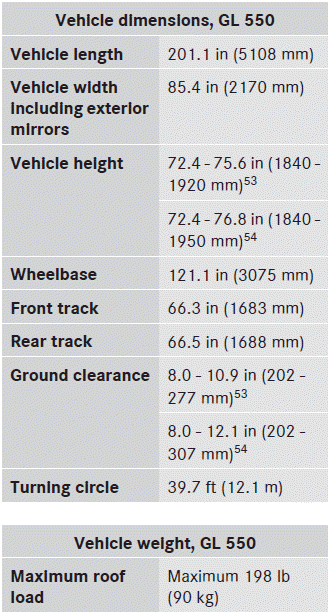
 Vehicle data, GL 450
The data stated here refers specifically to a
vehicle with standard equipment. Consult an
authorized Mercedes-Benz Center for the
data for all vehicle variants and trim levels.
...

See also:
Data stored in the vehicle
Information about electronic data
acquisition in the vehicle
(Including notice pursuant to California Code
§ 9951)
Your vehicle records electronic data. If your
vehicle is equipped with mbrace3, ...
Avoiding flat spots
In order to minimize flat spotting, the tire pressures can be increased to the
maximum as stated on the tire sidewall, for the period when the vehicle is stationary.
Tires must be returned to the ...
Service data recording
Service data recorders in your vehicle are capable of collecting and storing
diagnostic information about your vehicle. This potentially includes information
about the performance or status of var ...


