



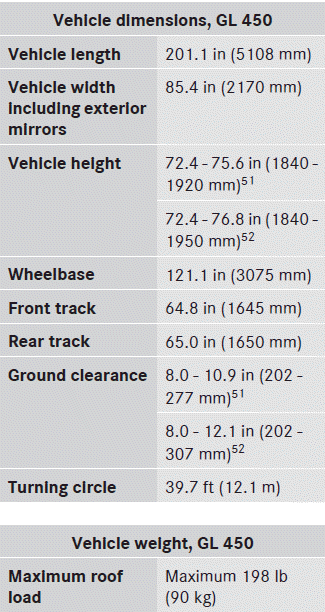
 Mercedes-Benz GL-Class: Vehicle data, GL 450
The data stated here refers specifically to a vehicle with standard equipment. Consult an authorized Mercedes-Benz Center for the data for all vehicle variants and trim levels.
 Vehicle data, GL 350 BlueTEC
The data stated here refers specifically to a
vehicle with standard equipment. Consult an
authorized Mercedes-Benz Center for the
data for all vehicle variants and trim levels.
...
 Vehicle data, GL 550
The data stated here refers specifically to a
vehicle with standard equipment. Consult an
authorized Mercedes-Benz Center for the
data for all vehicle variants and trim levels.
...
See also:
Stationary range changing
With the vehicle stationary, select N.
Move the transfer gearbox switch towards the range required and release. The
switch returns to the default position and range change status will be confirmed ...
Customer Satisfaction Procedure (U.S. and Canada)
Your satisfaction and goodwill are important to your dealer and to Cadillac.
Normally, any concerns with the sales transaction or the operation of the vehicle
will be resolved by your dealer's s ...
Headphones
A. Battery cover
B. Channel 1 or 2 switch
C. Power button
D. Volume control
E. Power indicator light
The RSE includes two 2-channel wireless headphones that are dedicated to this
system. Chan ...


