



 Infiniti QX: Turn signal switch
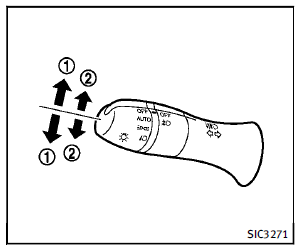
1 Turn signal
Move the lever up or down to signal the
turning direction. When the turn is completed,
the turn signals cancel automatically.
2 Lane change signal
To indicate a lane change, move the lever
up or down to the point where lights begin
flashing.
 Instrument brightness control
The instrument brightness control switch
can be operated when the ignition switch
is in the ON position. When the switch is
operated, the dot matrix liquid crystal
display switches to the ...
 Fog light switch
To turn the fog lights on, turn the headlight
switch to the position, then turn
the
switch to the position. To turn them
off, turn the switch to the OFF position.
The headlights must be o ...
See also:
Intelligent Brake Assist (IBA) system (if so equipped)
The Intelligent Brake Assist (IBA) system
warns the driver by a warning light and
chime when there is a risk of a collision
with the vehicle ahead in the traveling lane
and the driver must tak ...
Attaching the roof carrier
► Secure the roof carrier to roof rails
1.
► Observe the manufacturer's installation
instructions. ...
Setting the center air vents
1 Center air vent, left
2 Center air vent, right
3 Center vent thumbwheel, right
4 Center vent thumbwheel, left
► To open/close: turn thumbwheels 3 and 4
to the right or left. ...


