



 Infiniti QX: Troubleshooting guide
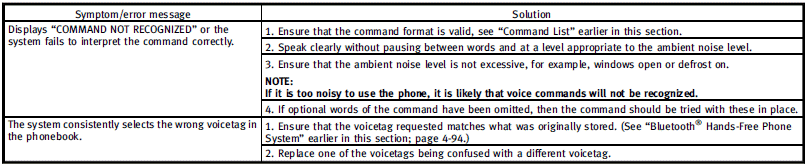
The system should respond correctly to all voice commands without difficulty. If problems are encountered, follow the solutions given in this guide for the appropriate error. Where the solutions are listed by number, try each solution in turn, starting with number one, until the problem is resolved.
 Using the system
Initialization
When the ignition switch is pushed to the
ON position, INFINITI Voice Recognition is
initialized, which may take up to one
minute. When completed, the system is
ready to accept ...

See also:
Service interval indicator
An upcoming service interval will be notified to the driver via the message center,
as either a distance or time left until service is due. Once the distance or time
are exceeded, the display will ...
Driving with a Trailer
WARNING
When towing a trailer, exhaust gases may collect at the rear of the vehicle and
enter if the liftgate, trunk/hatch, or rear-most window is open.
Engine exhaust contains Carbon Monoxide ...
When reading the manual
This manual includes information for all
options available on this model. Therefore,
you may find some information that does
not apply to your vehicle.
All information, specifications and illu ...


