



 Infiniti QX: Tray
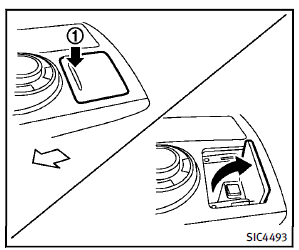
To open the tray, push the lid1 . To close, push the lid down. The USB and/or iPod® connector port is located inside the tray. (See “Audio system” in the “4. Monitor, climate, audio, phone and voice recognition systems” section or “iPod® player operation” in the “4. Monitor, climate, audio, phone and voice recognition systems” section.)
 Console box
Front
To open the console box, push up the knob
A and pull up the lid.
To close, push the lid down until latched.
Rear (if so equipped)
To open the lid, push the knob up A and
pull up th ...
 Coat hooks
The coat hooks are equipped at the rear
assist grips.
CAUTION
Do not place items which are more than 2 lb
(1 kg) on the hook.
...
See also:
If the engine fails to start
If the vehicle has been unlocked using the emergency key blade or the Smart Key
is not detected by the vehicle, it will be necessary to use the keyless start backup
to disarm the alarm and start t ...
Brake Fluid
The brake master cylinder reservoir is filled with DOT 3 brake fluid. See Engine
Compartment Overview for the location of the reservoir.
There are only two reasons why the brake fluid ...
Switching the windshield wipers on/off
WARNING
Wiper blades are components that are subject
to wear and tear. Replace the wiper blades
twice a year, preferably in the spring and fall.
Otherwise the windows will not be wiped ...


