



 Infiniti QX: Console box
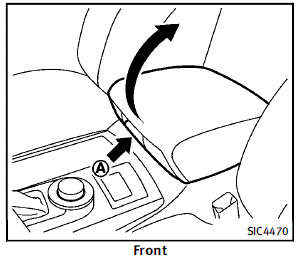
Front To open the console box, push up the knob A and pull up the lid. To close, push the lid down until latched.
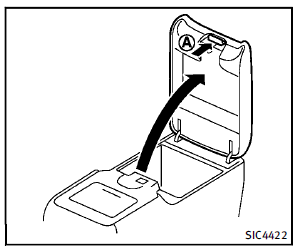
Rear (if so equipped)
To open the lid, push the knob up A and pull up the lid. To close, push the lid down until the lock latches.
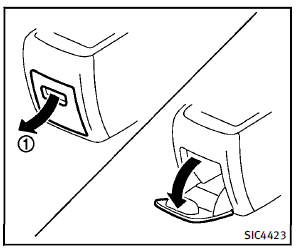
Pocket:
To open the pocket, pull the knob 1 . To close, push the lid until the lock latches.
 Glove box
WARNING
Keep glove box lid closed while driving to
help prevent injury in an accident or a
sudden stop.
To open the glove box, pull the handle1 .
To close, push the lid in until the lock
...
 Tray
Tray
To open the tray, push the lid1 . To close,
push the lid down.
The USB and/or iPod® connector port is
located inside the tray. (See “Audio system”
in the “4. Monitor, climate, audio, ...
See also:
Driving safety systems overview
In this section, you will find information about
the following driving safety systems:
• ABS (Anti-lock Braking System)
• BAS (Brake Assist System)
• ESP® (Electronic Stability Program)
...
Using voice control
Note:
The voice system has been designed to recognise a number of languages. However,
Land Rover cannot guarantee the system will be compatible with every accent group
within those languages. Ple ...
Opening the fuel-filler door
To open the fuel-filler door, unlock the fuelfiller
door by using one of the following
operations, then push the right side of the
door.
► Push the driver’s door handle request
swi ...


