



 Mercedes-Benz GL-Class: TIREFIT kit version 1
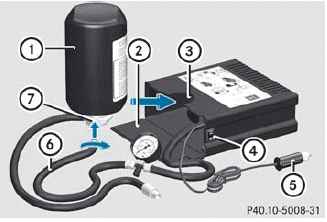
► Open flap 2.
► Pull connector 5 with the cable and hose
6 out of the housing.
► Screw hose 6 onto flange 7 of tire
sealant bottle 1.
► Insert tire sealant bottle : head
downwards into recess 3 of the tire
inflation compressor.
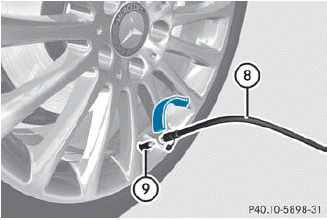
► Remove the cap from valve 9 on the faulty tire.
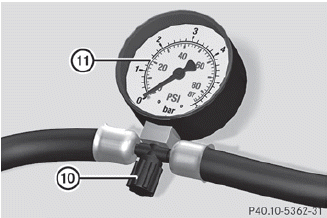
► Make sure pressure release screw 10 on
pressure gauge 11 is fully closed.
► Screw filler hose 8 onto valve 9.
► Insert connector 5 into the socket in the
footwell of the second row of seats.
 None of the other sockets or cigarette
lighters are designed for operating the tire
inflation compressor.
None of the other sockets or cigarette
lighters are designed for operating the tire
inflation compressor.
► Turn the SmartKey to position
1() in the ignition lock.
► Press on/off switch ? on the tire
inflation
compressor to I.
The tire inflation compressor is switched on. The tire is inflated.
 First, TIREFIT is pumped into the tire. The
pressure can briefly rise to approximately
500 kPa (5 bar/73 psi).
First, TIREFIT is pumped into the tire. The
pressure can briefly rise to approximately
500 kPa (5 bar/73 psi).
Do not switch off the tire inflation compressor during this phase.
► Allow the tire inflation compressor to run for five minutes. The tire should then have attained a pressure of at least 180 kPa (1.8 bar/26 psi).
Do not operate the tire inflation
compressor for longer than eight minutes
at a time without a break. It may otherwise
overheat.
The tire inflation compressor can be operated again once it has cooled down.
If a pressure of 180 kPa (1.8 bar/26 psi) has been achieved after five minutes, see.
If a pressure of 180 kPa (1.8 bar/26 psi) has not been achieved after five minutes, see.
 Using the TIREFIT kit
You can use the TIREFIT kit to seal small
punctures, particularly those in the tire tread.
You can use TIREFIT at outside temperatures
down to -4 °F (-20 °C).
WARNING
TIREFIT is a ...
 TIREFIT kit version 2
► Pull connector 4 with the cable and
hose
5 out of the housing.
► Screw hose 5 onto flange 6 of tire
sealant bottle 1.
► Insert tire sealant bottle 1 head
downwards into re ...
See also:
File System and Naming
The song name that displays is the song name that is contained in the ID3 tag.
If the song name is not present in the ID3 tag, then the radio displays the file
name without the extension (such as .m ...
Remote Keyless Entry (RKE) System
The RKE transmitter is used to remotely lock and unlock the doors from up to
60m (195 ft) away from the vehicle.
Press to unlock the driver door.
Press again within three seconds
to unlock all ...
Introduction
The Settings menu can be used for:
• restoring the factory settings
• changing the instrument cluster settings
• changing the time/date settings
• changing the light settings
• changi ...


