



 Cadillac Escalade: Steering Wheel Adjustment
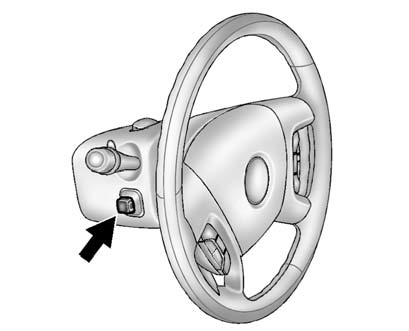
Push the control up or down to tilt the steering wheel up or down.
To set the memory position, see Vehicle Personalization .
 Interior Mirror
Adjustment
Hold the rearview mirror in the center and move it to view the area behind the
vehicle.
Automatic Dimming Rearview Mirror
The mirror will automatically reduce the glare from the headlam ...
 Throttle and Brake Pedal Adjustment
The vehicle has adjustable throttle and brake pedals that allow you to change
their positions.
The switch used to adjust the pedals is located on the center console below the
climate control syst ...
See also:
Voice Recognition
The navigation system's voice recognition allows for hands-free operation of
the navigation system, audio system, and OnStar (if equipped) features.
Voice recognition can be used when the igniti ...
Distracted Driving
Distraction comes in many forms and can take your focus from the task of driving.
Exercise good judgment and do not let other activities divert your attention away
from the road. Many local governme ...
Coverage
Services are provided up to 5 years/ 160 000 km (100,000 mi), whichever comes
first.
In the U.S., anyone driving the vehicle is covered. In Canada, a person driving
the vehicle without permission f ...


