



 Mercedes-Benz GL-Class: SmartKey
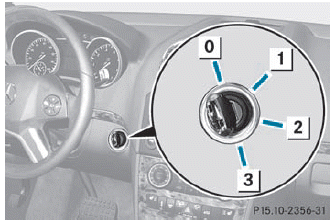
0 To remove the SmartKey
1 Power supply for some consumers, such
as the windshield wipers
2 Ignition (power supply for all consumers)
and drive position
3 To start the engine
 The SmartKey can be turned in the
ignition lock even if it is not the correct
SmartKey for the vehicle. The ignition is not
switched on. The engine cannot be started.
The SmartKey can be turned in the
ignition lock even if it is not the correct
SmartKey for the vehicle. The ignition is not
switched on. The engine cannot be started.

 KEYLESS-GO
General information
Vehicles with KEYLESS-GO are equipped with
a SmartKey featuring an integrated KEYLESSGO
function and a detachable Start/Stop
button.
The Start/Stop button must be inserted i ...
See also:
Clock
If the power supply is disconnected, the
clock will not indicate the correct time.
Readjust the time.
ADJUSTING THE TIME
1. To set the clock forward, push the
button 1 .
2. To set the cloc ...
Rear Window Defogger
The rear window defogger uses a warming grid to remove fog from the rear window.
(Rear Window Defogger):
Press to turn the rear window defogger on or off. It automatically turns off
after it has b ...
California Proposition 65 Warning
Most motor vehicles, including this one, contain and/or emit chemicals known
to the State of California to cause cancer and birth defects or other reproductive
harm. Engine exhaust, many parts and s ...


