



 Mercedes-Benz GL-Class: Setting the side air vents
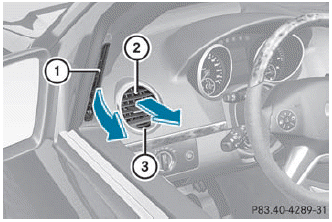
► To open/close: turn thumbwheel 3 to the left or right.
 Side window defroster vent 1 is never
completely shut, even if side air vent 2 is
shut.
Side window defroster vent 1 is never
completely shut, even if side air vent 2 is
shut.
 Setting the center air vents
1 Center air vent, left
2 Center air vent, right
3 Center vent thumbwheel, right
4 Center vent thumbwheel, left
► To open/close: turn thumbwheels 3 and 4
to the right or left. ...
 Setting the rear-compartment airvents
Setting the center vents in the rear
compartment
1 Rear-compartment air vent, left
2 Rear-compartment air vent, right
3 Rear control panel
When the climate control panel is switched
on/off, th ...
See also:
Trailer Brakes
A loaded trailer that weighs more than 900 kg (2,000 lbs) needs to have its own
brake system that is adequate for the weight of the trailer. Be sure to read and
follow the instructions for the trail ...
Setting a speed
WARNING
Keep in mind that it may take a brief moment
until the vehicle has made the necessary
adjustments.
Increase or decrease the set vehicle speed to
a value that the prevailing ro ...
Securing an Add-On Child Restraint in the Vehicle
WARNING
A child can be seriously injured or killed in a crash if the child restraint
is not properly secured in the vehicle. Secure the child restraint properly in the
vehicle using the vehicle ...


