



 Mercedes-Benz GL-Class: Setting the center air vents
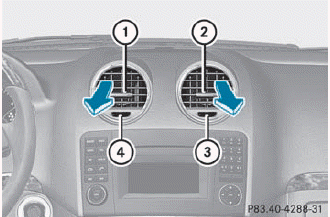
1 Center air vent, left
2 Center air vent, right
3 Center vent thumbwheel, right
4 Center vent thumbwheel, left
► To open/close: turn thumbwheels 3 and 4 to the right or left.
 Important safety notes
WARNING
When operating the climate control, the air
that enters the passenger compartment
through the air vents can be very hot or very
cold (depending on the set temperature). This
c ...
 Setting the side air vents
► To open/close: turn thumbwheel 3 to the
left or right.
Side window defroster vent 1 is never
completely shut, even if side air vent 2 is
shut. ...
See also:
Product information
Mercedes-Benz recommends that you use
genuine Mercedes-Benz parts, conversion
parts and accessories that have been
approved for the type of vehicle.
Mercedes-Benz tests genuine parts as well as
...
Finding a Station
AM Source Shown, Other Sources Similar
If viewing a map screen, press the source screen (AM, FM, XM (if equipped), CD,
etc.) button. The display splits between the audio screen and the map screen. ...
Radio Reception
Frequency interference and static can occur during normal radio reception if
items such as cell phone chargers, vehicle convenience accessories, and external
electronic devices are plugged into the ...


