



 Mercedes-Benz GL-Class: Roadside Assistance button
► Open the stowage compartment under the armrest.
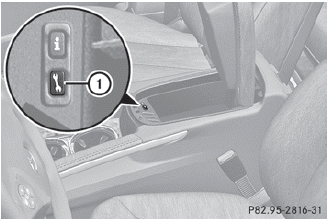
► Press and hold Roadside Assistance button 1 for more than two seconds.
This initiates a call to the Mercedes-Benz Customer Assistance Center. The indicator lamp in Roadside Assistance button 1 flashes while the call is active. The Connecting Call message appears in the multifunction display. The audio output is muted.
If a connection can be established, the Call Connected message appears in the multifunction display.
If a cellular phone network is available and there is sufficient GPS reception, the mbrace system transmits data to the Mercedes-Benz Customer Assistance Center, for example:
• current location of the vehicle
• vehicle identification number
 The COMAND display shows that an
mbrace call is active. During the call, you
can change to the navigation menu by
pressing the NAV button on COMAND, for
example.
The COMAND display shows that an
mbrace call is active. During the call, you
can change to the navigation menu by
pressing the NAV button on COMAND, for
example.
Voice output is not available.
A voice connection is established between the Mercedes-Benz Customer Assistance Center and the vehicle occupants.
► Describe the type of assistance needed.
The Mercedes-Benz Customer Assistance Center either sends a qualified Mercedes- Benz technician or organizes for your vehicle to be transported to the nearest authorized Mercedes-Benz Center. You may be charged for services such as repair work and/or towing. Further details are available in your mbrace manual.
The mbrace system failed to initiate a
Roadside Assistance call if:
• the indicator lamp in Roadside
Assistance button 1 is flashing
continuously.
• no voice connection to the Mercedes-
Benz Customer Assistance Center was
established.
This may be because the corresponding mobile phone network is not available.
The Call Failed message appears in the multifunction display.
► To end a call: press the
 button on the
multifunction steering wheel.
button on the
multifunction steering wheel.
or
► Press the corresponding button for ending
a phone call on COMAND
 Emergency call
Important safety notes
A license agreement must exist in order
to activate the mbrace service. Ensure that
your system is activated and ready for use,
and press the MB Info call button
to
re ...
 MB Info call button
► Open the stowage compartment under the
armrest.
► Press and hold MB Info call button 1
for
more than two seconds.
This initiates a call to the Mercedes-Benz
Customer Assistanc ...
See also:
When to Check Lubricant
It is not necessary to regularly check rear axle fluid unless there is a leak
suspected or an unusual noise is heard. A fluid loss could indicate a problem. Have
it inspected and repaired.
All axle ...
From Map
This destination entry method allows you to select a destination by scrolling
on the map.
From Map: Press to enter the From
Map destination entry method.
To use this destination entry method:
...
Steering
Hydraulic Power Steering
Your vehicle has hydraulic power steering. It may require maintenance. See Power
Steering Fluid .
If power steering assist is lost due to a system malfunction, the vehicle ...


