



 Cadillac Escalade: Reclining Seatbacks
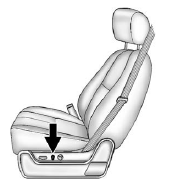
To adjust the seatback:
- Tilt the top of the control rearward to recline.
- Tilt the top of the control forward to raise.
See Reclining Seatbacks .
 Lumbar Adjustment
To adjust the lumbar support:
Press and hold the front or rear of the control to increase or decrease
lumbar support.
Press and hold the top or bottom of the control to raise or lower the
...
 Memory Features
The controls on the driver door are used to program and recall memory settings
for the driver seat, outside mirrors, power steering column, and the adjustable
throttle and brake pedals. ...
See also:
General program (special programs off)
This program is compatible with all on and off-road conditions. If not already
active, it should be selected before driving on surfaces which are similar to a
hard road surface. Dry cobbles, tar ...
Hill Start Assist system
WARNING
► Never rely solely on the hill start assist
system to prevent the vehicle from
moving backward on a hill. Always drive
carefully and attentively. Depress the
brake pedal when ...
Seats
WARNING
► Do not ride in a moving vehicle when the
seatback is reclined. This can be dangerous.
The shoulder belt will not be
against your body. In an accident, you
could be thrown ...


