



 Cadillac Escalade: Lumbar Adjustment
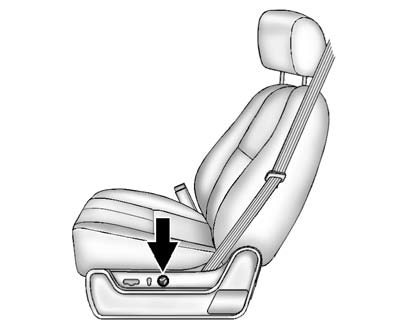
To adjust the lumbar support:
- Press and hold the front or rear of the control to increase or decrease lumbar support.
- Press and hold the top or bottom of the control to raise or lower the height of the support.
See Lumbar Adjustment .
 Seat Adjustment
To adjust the seat:
Move the seat forward or rearward by sliding the control forward or rearward.
Raise or lower the front or rear part of the seat cushion by moving the
front or rear of the ...
 Reclining Seatbacks
To adjust the seatback:
Tilt the top of the control rearward to recline.
Tilt the top of the control forward to raise.
See Reclining Seatbacks . ...
See also:
Passenger Sensing System
The passenger sensing system, if equipped, turns off the front outboard passenger
frontal airbag under certain conditions. No other airbag is affected by the passenger
sensing system.
If the vehicl ...
Uniform Tire Quality Grading
Quality grades can be found where applicable on the tire sidewall between tread
shoulder and maximum section width.
For example:
Treadwear 200 Traction AA Temperature A
The following information ...
Remote key fob battery replacement
Note: There are two designs of Smart Key, refer to the information which is relevant
to the design of Smart Key supplied with the vehicle.
When the battery needs renewing, there will be a significa ...


