



 Mercedes-Benz GL-Class: Rear view camera
Important safety notes
The rear view camera is an optical parking aid.
It shows the area behind your vehicle in the COMAND display.
WARNING 
Make sure that no persons or animals are in
the maneuvering range. Otherwise, they
could be injured.
The rear view camera is located in the handle strip of the tailgate.
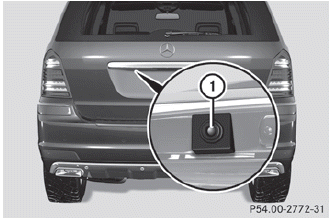
1 Rear view camera

 View through the camera
The area behind the vehicle is displayed as a
mirror image, as in the rear-view mirror.
WARNING
The rear view camera is only an aid and may
display obstacles
• from a distorted pers ...
See also:
Reporting malfunctions relevant tosafety
For the USA only:
The following text is reproduced as required
of all manufacturers according to Title 49,
Code of U.S. Federal Regulations, Part 575
pursuant to the National Traffic and Motor
...
Instrument panel
1. Side ventilator
2. Meters and gauges
3. Hazard indicator flasher switch
4. Center ventilator
5. Center multi-function control panel
— Vehicle information and setting
buttons
6. Ce ...
Keys
WARNING
Leaving children in a vehicle with the ignition key is dangerous for many reasons.
Children or others could be badly injured or even killed. They could operate the
power windows or othe ...


