



 Mercedes-Benz GL-Class: Number of seats
 The specifications shown on the Tire and
Loading Information placard in the
illustration are examples. The number of
seats is vehicle-specific and can differ from
the details shown. The number of seats in
your vehicle can be found on the Tire and
Loading Information placard.
The specifications shown on the Tire and
Loading Information placard in the
illustration are examples. The number of
seats is vehicle-specific and can differ from
the details shown. The number of seats in
your vehicle can be found on the Tire and
Loading Information placard.
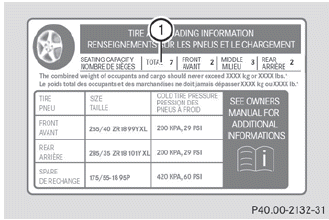
Maximum number of seats 1 determines the maximum number of occupants allowed to travel in the vehicle. This information can be found on the Tire and Loading Information placard.
 Maximum permissible gross vehicleweight rating
The specifications shown on the Tire and
Loading Information placard in the
illustration are examples. The maximum
permissible gross vehicle weight rating is
vehicle-specific and may differ from ...

See also:
Video Display Screens
The video display screens are located on the back of each head restraint.
Notice: Avoid directly touching the video screen, as damage can occur. See “Cleaning
the Video Screens” later in this ...
Hitches
The correct hitch equipment helps maintain combination control. Many trailers
can be towed with a weight carrying hitch which simply features a coupler latched
to the hitch ball, or a tow eye latche ...
Windshield Wiper/Washer
The front wiper control is located on the turn and lane-change lever.
Turn the band with the wiper symbol to control the windshield wipers.
(Mist): For a single wipe, turn to
, then release.
For ...


