



 Cadillac Escalade: Hazard Warning Flashers
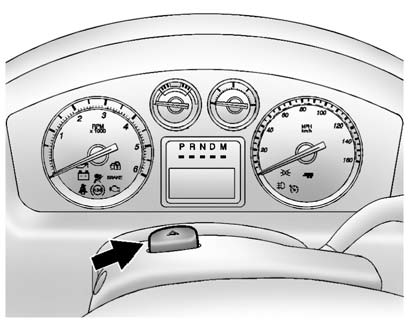
 (Hazard Warning Flashers):
Press this button located on top of the steering column, to make the front and rear turn signal lamps flash on and off. This warns others that you are having trouble. Press again to turn the flashers off.
When the hazard warning flashers are on, the vehicle's turn signals will not work.
 Automatic Headlamp System
When it is dark enough outside, the automatic headlamp system turns on the headlamps
at the normal brightness, along with the taillamps, sidemarker, parking lamps, and
the instrument panel lights. T ...
 Turn and Lane-Change Signals
An arrow on the instrument panel cluster flashes in the direction of the turn
or lane change.
Move the turn signal lever all the way up or down to signal a turn.
Raise or lower the lever until th ...
See also:
Manual Fold and Tumble Feature
Folding and Tumbling the Seat
To fold and tumble the seat:
1. Make sure that there is nothing under, in front of, or on the seat.
Notice: Folding a rear seat with the safety belts still fastened ma ...
Dual Automatic Climate Control System
The heating, cooling, and ventilation in the vehicle can be controlled with this
system. The vehicle also has a flow-through ventilation system described later in
this section.
Climate Control wi ...
Overview of occupant safety
In this section, you will learn the most
important facts about the restraint system
components of the vehicle.
The restraint system consists of:
• seat belts
• child restraint systems
• ...


